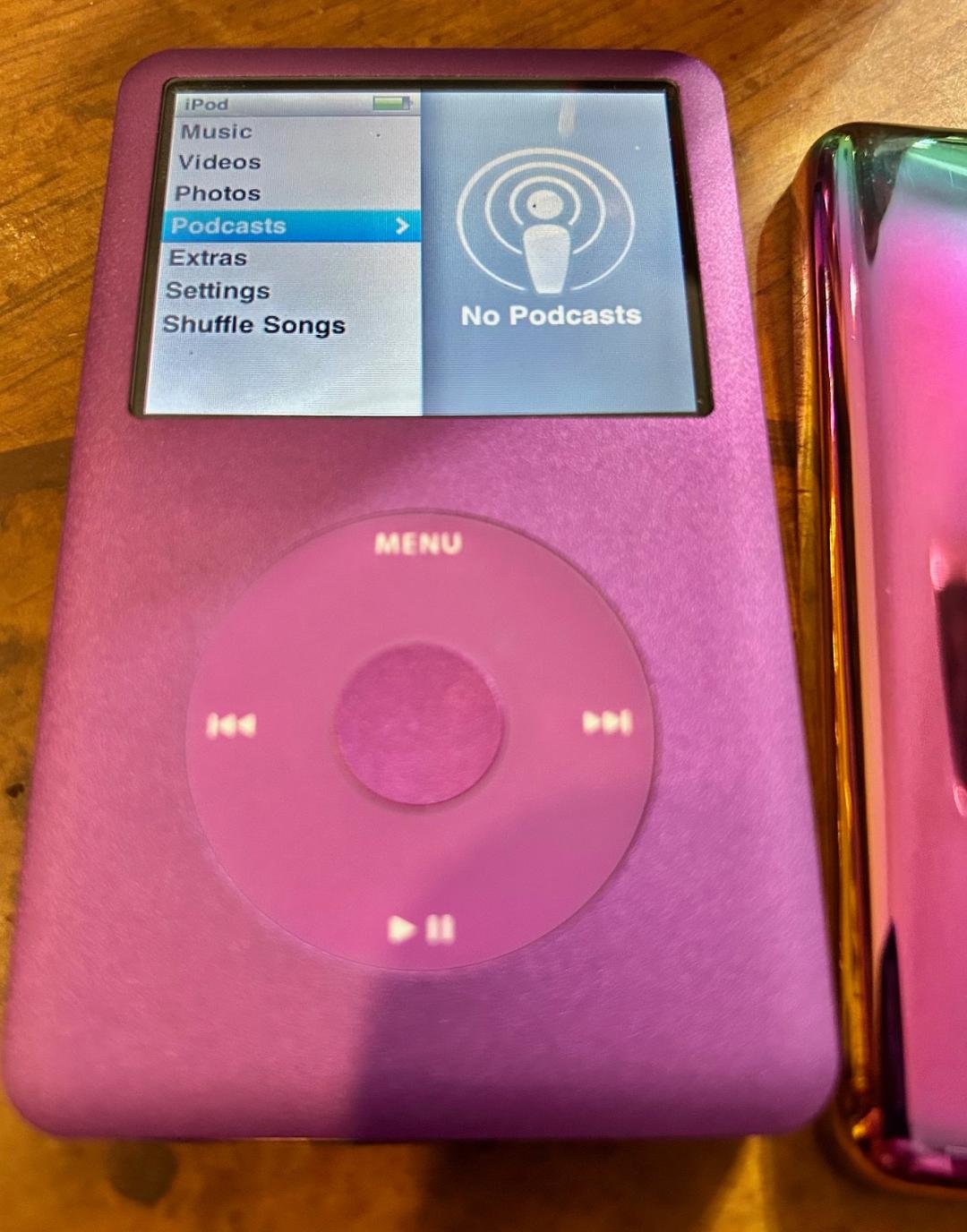
The rumble of a physical scroll wheel, the familiar heft of aluminum, the promise of thousands upon thousands of songs in your pocket without a single notification or data plan worry—that's the magic of the 6th Generation iPod Classic. For many, this isn't just a relic; it's the pinnacle of portable music, a device cherished for its unparalleled storage and focused purpose. But even a legend can be made better, more resilient, and more versatile with the right companions. If you're looking to enhance, protect, or even revive your beloved player, diving into the world of Best Accessories and Peripherals for the 6th Generation iPod Classic is a journey well worth taking.
At a Glance: Essential iPod Classic Enhancements
- Protection: High-quality cases (silicone, hard shell, leather) and screen protectors are non-negotiable for longevity.
- Power: Reliable 30-pin charging cables, wall adapters, and car chargers are crucial. Consider battery replacement for aging devices.
- Audio: Invest in great wired headphones; explore AUX cables or FM transmitters for car integration.
- Storage Upgrade: Flash modding (iFlash adapters with SD/CF cards) transforms capacity and performance.
- Convenience: Docks for home use, armbands for exercise, and even wired remote controls can add to the experience.
More Than Just Nostalgia: Why Invest in Your iPod Classic?
Let's be honest: in an era dominated by streaming and smartphones, talking about iPod Classic accessories might sound quaint to some. But for those who've held onto their 6th Gen Classic—whether it's the sleek 80GB, the more substantial 120GB, or the behemoth 160GB model—it's about more than nostalgia. It’s about owning a dedicated music player that excels at its job. It's about a tactile experience, unparalleled battery life (after a refresh!), and the sheer joy of a massive, curated music library untouched by digital distractions.
The truth is, many of these devices are now well over a decade old. Time takes its toll on everything from batteries to hard drives. But unlike many modern gadgets designed for obsolescence, the iPod Classic was built with a surprising degree of repairability and upgradability in mind. With the right accessories and a bit of know-how, you can not only extend its life but genuinely improve its performance and utility. Think of it as restoring a classic car—it takes effort, but the payoff is immense.
The First Line of Defense: Protecting Your Investment
Your iPod Classic is a beautifully engineered piece of kit, but it's not indestructible. Dings, scratches, and drops are the enemies of pristine metal and glass. Thankfully, a robust accessory market exists to keep your player looking and functioning like new.
Rugged Cases: Shielding Your Classic from the World
A good case is paramount. It's not just about aesthetics; it's about preserving resale value and, more importantly, keeping the internal components safe from everyday bumps and scrapes. When choosing a case, consider your lifestyle and how you use your iPod.
- Silicone Cases: These are often the most affordable and offer excellent grip. They're great for absorbing minor impacts and preventing scratches, but they can sometimes attract lint. Look for ones with precise cutouts for the screen, click wheel, and ports.
- Hard Shell Cases: Typically made from polycarbonate, these provide more rigid protection against drops and crushing forces. They often snap around the iPod, offering a snug fit. Some combine a clear hard shell with a soft rubberized interior for dual-layer defense.
- Leather/PU Leather Cases: For a touch of classic elegance, leather cases offer a premium feel and decent scratch protection. Many come with belt clips or stand features. While stylish, they might not offer the same shock absorption as silicone or hard shells.
- Armbands: If your iPod Classic still serves as a workout companion, an armband is essential. These secure the device to your arm, keeping it out of the way during runs or gym sessions. Ensure it's sweat-resistant and offers easy access to the click wheel.
No matter the material, always ensure the case fits snugly without impeding access to the headphone jack, 30-pin connector, or hold switch. A loose case can do more harm than good, letting dust and debris creep in.
Crystal Clear Vision: Screen Protectors
The iPod Classic's screen, while not a vibrant Retina display, is still crucial for navigation. A scratched screen is not only an eyesore but can also reduce visibility.
- Film Protectors: These thin, transparent films are cost-effective and provide excellent scratch resistance. They're barely noticeable once applied correctly, but bubbles can be an issue if you're not careful.
- Tempered Glass Protectors: Offering superior impact protection and a smoother feel, tempered glass is the premium choice. It's thicker than film but often easier to apply without bubbles. It also maintains the original screen's clarity with impressive fidelity.
When applying any screen protector, work in a dust-free environment, clean the screen thoroughly with a microfiber cloth, and use any provided application tools to ensure a bubble-free finish. A well-protected screen enhances the overall experience of your Apple iPod Classic 6th Generation.
Keeping the Beats Alive: Power & Connectivity
An iPod without power is just an aluminum brick. Ensuring your Classic stays charged and connected is fundamental to its continued enjoyment.
The Lifeline: Charging Cables & Wall Adapters
The 6th Gen iPod Classic uses the venerable 30-pin connector, a familiar sight to anyone who owned older Apple devices. While newer iPhones use Lightning or USB-C, 30-pin cables are still readily available.
- Original Apple 30-pin Cables: If you can find them new or gently used, these are often the most reliable. They ensure perfect compatibility and charging safety.
- MFi Certified Third-Party Cables: "Made For iPod" (MFi) certification means a third-party accessory has been approved by Apple to meet their performance and safety standards. These are generally reliable and a good alternative to original cables.
- Generic Third-Party Cables: Be cautious with uncertified, very cheap cables. While many work fine, some can cause slow charging, data transfer issues, or even damage to your iPod's charging circuitry. Always check reviews before purchasing.
You'll also need a power source. While you can charge via a computer's USB port, a dedicated wall adapter is often faster and more convenient. Any standard USB wall adapter (5V, 1A or 2A) will work with a 30-pin USB cable. For car charging, a USB car adapter is equally effective.
The Home Base: Docks and Syncing Solutions
For a more elegant home setup, a dock serves multiple purposes: it charges your iPod, provides a stable stand, and often offers audio output for connecting to a stereo system.
- Apple Universal Dock: These were designed to work with various iPod models (with interchangeable inserts) and offer audio line-out. They're great for integrating your Classic into a home audio setup.
- Third-Party Docks: Many manufacturers produced docks that might also include speakers, remote controls, or even alarm clock functions. Look for these on secondary markets.
- Dedicated Syncing: Remember, for managing your music, you'll still need iTunes (or Music app on newer macOS versions) on a computer and a reliable 30-pin cable. Some docks facilitate syncing directly, but a direct cable connection is usually preferred for large transfers.
Breathing New Life: Battery Replacement Kits
One of the most common issues with an aging iPod Classic is a failing battery. Decreased playback time, spontaneous shutdowns, and slow charging are all tell-tale signs. The good news is that the 6th Gen iPod Classic's battery is replaceable.
- DIY Kits: Many vendors sell replacement battery kits that include the battery itself and the necessary pry tools. Sites like iFixit (as per our research context) are invaluable resources, offering not just parts but also free, step-by-step repair guides.
- Benefits of a New Battery: A fresh battery can restore your iPod Classic to its original, impressive battery life—sometimes over 30 hours of continuous music playback. It's one of the most impactful upgrades you can make.
- Considerations: This is a delicate operation. Opening the iPod Classic requires patience and a gentle touch, as the case can be quite stubborn. If you're not comfortable with small electronics repair, consider seeking professional help.
Elevating the Sonic Experience: Audio Peripherals
The iPod Classic was built for one thing: delivering high-quality audio. While its internal DAC (Digital-to-Analog Converter) is perfectly respectable, the output chain is only as strong as its weakest link. Good headphones and external audio solutions can make a world of difference.
The Earcandy: Headphones & Earbuds
Since the 6th Gen iPod Classic lacks native Bluetooth audio streaming, you're tethered to the 3.5mm headphone jack. This isn't a limitation; it's an opportunity to embrace the simplicity and quality of wired audio.
- High-Quality Wired Headphones: This is where your investment will pay dividends. Audiophile-grade wired headphones (over-ear, on-ear, or in-ear monitors/IEMs) will reveal details in your music that cheaper earbuds simply can't reproduce. Brands like Sennheiser, Audio-Technica, Grado, and Shure offer fantastic options across various price points.
- Inline Remote & Mic: While the Classic doesn't have phone call capabilities, some wired headphones include an inline remote for play/pause and volume control. These can be convenient for controlling your music without touching the iPod itself. Just ensure compatibility with the iPod's control signals.
Remember, the iPod Classic doesn't have an onboard amplifier with a huge amount of power. Extremely high-impedance headphones might benefit from a portable headphone amplifier, but for most quality consumer headphones, the Classic's output is sufficient.
Sharing the Sound: Portable Speakers
For those moments when you want to share your tunes, a simple portable speaker connected via a 3.5mm AUX cable is the way to go.
- AUX-In Speakers: Look for battery-powered portable speakers with a 3.5mm audio input. Many older models (predating ubiquitous Bluetooth) are perfect for this and can often be found at a bargain.
- iPod Dock Speakers: As mentioned with docks, many speaker systems were built specifically with a 30-pin iPod dock. These can be great all-in-one solutions for a bedroom or office, offering both charging and playback.
On the Road Again: Car Integration
Integrating your iPod Classic into your car's audio system allows you to enjoy your entire music library on the go.
- AUX Input: The simplest and best quality option. If your car stereo has a 3.5mm AUX input, a cheap male-to-male AUX cable is all you need.
- FM Transmitters: If your car lacks an AUX input, an FM transmitter plugs into the iPod's headphone jack (or 30-pin port, if it's a dedicated model) and broadcasts the audio to an unused FM frequency on your car radio. Quality can vary depending on signal interference, but they're a common solution.
- Dedicated iPod Car Kits: Some older vehicles (or aftermarket head units) offered direct 30-pin iPod integration. These often provided superior sound quality and allowed control of the iPod from the car stereo's interface. Check your car's specific compatibility if you have an older model.
The Holy Grail: Storage Expansion and Performance Boosts
This is perhaps the most exciting and transformative upgrade you can make to a 6th Generation iPod Classic. The original models came with spinning hard disk drives (HDDs), which are susceptible to shock damage and are the biggest drain on battery life. The "Flash Mod" revolution changes everything.
Understanding the Limitations: Why Upgrade Storage?
The stock hard drives in iPod Classics are mechanical. They use spinning platters and read/write heads. This means they are:
- Fragile: A drop can cause a "skipped" or "sad iPod" error, indicating hard drive failure.
- Power-Hungry: The motor for spinning platters and moving heads consumes significant battery power.
- Limited in Capacity: While 160GB was massive at the time, modern flash storage dwarfs it.
The Flash Mod Revolution: iFlash Adapters
The ingenious solution involves replacing the mechanical hard drive with flash memory, typically in the form of SD cards or CompactFlash (CF) cards, using a specialized adapter called an "iFlash" board.
- How it Works: You open your iPod Classic (similar to a battery replacement), remove the old hard drive, and replace it with an iFlash adapter board. Onto this board, you then insert one or more SD cards (or a CF card). The iPod's firmware recognizes this new storage as if it were the original HDD.
- Types of iFlash Adapters:
- iFlash-Solo: For a single SD card.
- iFlash-Dual: For two SD cards, allowing for higher capacity.
- iFlash-Quad: For four SD cards, offering the highest potential capacity (e.g., 4x 1TB SD cards for 4TB total!).
- iFlash-CF: For a single CompactFlash card.
- Benefits of Flash Modding:
- Massive Capacity: Easily achieve 256GB, 512GB, 1TB, or even 2TB+ of storage, allowing you to carry virtually your entire music collection.
- Incredible Durability: Flash memory has no moving parts, making your iPod Classic virtually shockproof.
- Extended Battery Life: Eliminating the power-hungry HDD can double or even triple your battery life, especially when combined with a new battery.
- Faster Performance: Menu navigation and loading times can feel noticeably snappier.
- Reduced Heat and Noise: No more spinning platters means a cooler, silent operation.
- Considerations & Pitfalls:
- DIY Difficulty: This is an intermediate-level mod. Opening the case can be challenging, and you'll need to be careful with ribbon cables. Again, iFixit guides are your friend.
- Cost: High-capacity SD cards can be expensive, adding to the overall cost of the mod. However, the performance and capacity gains are often seen as well worth it.
- SD Card Quality: Use reputable, high-speed SD cards (UHS-I or UHS-II) from trusted brands to ensure reliability and performance.
- Firmware Limits: While iFlash adapters support massive capacities, the iPod Classic firmware itself might have practical limits on how many tracks it can effectively index (often around 50,000 to 60,000 songs, though some report more).
Flash modding truly transforms the 6th Gen iPod Classic from a cherished vintage device into a truly modern, high-capacity, and robust portable music powerhouse. It's the ultimate upgrade for dedicated users.
Beyond the Essentials: Niche & Nostalgic Gear
While not strictly necessary, some accessories cater to specific needs or add a touch of retro charm.
- Wired Remote Controls: Before inline headphone remotes were common, some iPods supported dedicated wired remotes that plugged into the 30-pin port. These are rare but offer full control without reaching for the iPod.
- Auxiliary Power Banks: If you travel extensively and haven't upgraded your battery, a small portable power bank with a USB-A port and your 30-pin cable can keep your Classic charged on the go.
- Retro Skins and Decals: Want to personalize your Classic? Custom skins can protect against scratches while giving your device a unique look, often mimicking older iPod designs or popular culture themes.
Making Smart Choices: What to Look For in Accessories
Navigating the accessory market for a vintage device can be tricky. Here’s what to keep in mind to ensure you get quality gear:
- Compatibility is Key: Always double-check that an accessory explicitly states compatibility with the "6th Generation iPod Classic" or "iPod Video/Classic" (as they share many accessories). The 30-pin connector is standard, but some cases or docks might be model-specific.
- Quality Over Price: Especially for charging cables and adapters, cheap, unbranded options can be unreliable or even risky. Invest a little more in MFi-certified products or reputable brands.
- Reputable Sellers: For new items, stick to well-known electronics retailers. For vintage or specialized items (like iFlash boards), look for sellers with high ratings and positive reviews on platforms like eBay or dedicated iPod modding communities.
- Read Reviews: Customer reviews offer invaluable insights into real-world performance and durability. Pay attention to comments regarding fit, functionality, and longevity.
- Consider Used/Refurbished: For older or discontinued accessories (like Apple Universal Docks), the used market is often the only option. Inspect photos carefully and buy from sellers with good return policies.
- DIY vs. Professional: For internal upgrades like battery or flash mods, honestly assess your comfort level with electronics repair. If in doubt, a professional repair service specializing in iPods can save you headaches.
Common Pitfalls & Misconceptions to Avoid
Even with all the options available, there are a few traps enthusiasts can fall into.
- "Any 30-pin cable will do": While many generic cables work, quality varies widely. A poorly made cable can lead to slow charging or even damage. Stick to MFi or reputable brands.
- "It has Bluetooth, right?": No, the 6th Gen iPod Classic does not have native Bluetooth for audio streaming. Its wireless capabilities are limited to some accessories that might have connected via the 30-pin port for data. Any Bluetooth functionality would require a specific 30-pin Bluetooth adapter, which typically adds bulk and can degrade audio quality.
- "It's too old to find good accessories": Not true! The passionate community surrounding the iPod Classic ensures a robust market for both new specialized parts (like iFlash adapters) and well-preserved original accessories.
- "All hard drives are the same": The Classic typically used 1.8-inch ZIF hard drives. While some models used different thicknesses, it's crucial to get the correct form factor if you're replacing with another HDD (though flash modding is generally preferred).
- "I can just drop my new flash-modded iPod": While flash mods make your iPod significantly more durable than an HDD-based one, it's not indestructible. The screen and case can still be damaged. Treat it with care.
Embracing the Enduring Legacy: Extending Your Classic's Lifespan
The 6th Generation iPod Classic remains a testament to a time when dedicated devices reigned supreme. Its tactile interface, robust build, and singular focus on music make it a beloved device even today. By investing in the right accessories and peripherals, you're not just buying gadgets; you're actively preserving a piece of personal and technological history.
Whether you're safeguarding it with a sturdy case, revitalizing its power with a new battery, or transforming its storage capacity with a flash mod, each accessory contributes to extending the life and enhancing the enjoyment of your Classic. It's about empowering your device to continue delivering the unparalleled musical experience it was designed for. So go ahead, dust off your iPod, explore the possibilities, and let the good times roll—or rather, scroll. Your perfect music companion is ready for its next chapter, made even better by the smart choices you make today.